
Mobile app development, from idea to store release
— Short answer
Getting a mobile app built is more than drawing screens: the server side, an admin panel, the store release and the maintenance after launch are all part of the job. We work with senior engineers and a written scope and timeline before work starts, with visible progress from week one and a full year of direct support after launch. If a ready-made tool is enough to test a simple idea, we will say so plainly.
No-code tool, freelancer, agency or in-house team: which one when?
The right way to get a mobile app built is not the same for everyone. If you want to test an idea quickly, a no-code tool may be enough, and we will say so. The table puts the four options side by side.
| Option | Fits when | Limit | Watch out for |
|---|---|---|---|
| No-code tool | Testing an idea fast; few screens, simple data | Custom business rules, fine performance tuning and the tool's own constraints; leaving the tool is hard | Whose account the app and the data live in, and what happens when the subscription ends |
| Freelancer | A small job with a clear scope | Dependence on one person; maintenance and continuity risk | Handover of code and accounts, what happens if the person moves on |
| Software studio (us) | You need the app, the server side, an admin panel and the release together, and you want support afterwards | Can be too heavy for a very small, single-screen job | Who actually writes the code, and whether the scope is in writing |
| In-house team | Mobile is the permanent core of your product | Hiring time and cost delay the first version | Who carries the load until the team has grown |
If a no-code tool does the job, we will tell you plainly. As we say on our home page, the first conversation is a real one: we are honest about whether it is the right time and the right fit.
iOS and Android: one codebase or two?
Whether to use a single codebase for both platforms or write a separate app for each is the most common decision in mobile app development. The right answer depends on the product. These are the criteria:
| Criterion | One codebase (cross-platform) | Separate native apps |
|---|---|---|
| Maintenance load | One code, one team; a change reaches both platforms | Two codebases, two maintenance lines |
| Access to device features | Most features arrive through ready bridges; very specialized ones may need native code | Full access, every new feature usable at once |
| Look and feel | Extra work is needed to respect each platform's habits | Natural fit with each platform's rules |
| Performance | Enough for most business apps; a limit with very heavy graphics | The highest control |
| New operating system features | You may wait for the library to catch up | Usable immediately |
Because we write down the reasoning behind every technical decision, you get the reasoning for this choice in writing too. The Smart Home Control App in our portfolio uses React Native as its technology. Devices report their state differently by brand, so an MQTT layer reduces them all to a single model the app can rely on; the product was designed mobile-first from the start for daily use.
Mobile app or web app?
Not every idea needs a mobile app. How often will your users open it? Does it need device features such as the camera, location, notifications or Bluetooth? Does it have to work offline? Is being in the app stores a distribution advantage for you or an unnecessary hurdle? Your answers decide between a mobile app and a web application that works well on a phone. We build both, so we can offer a neutral recommendation; if the answer is web, we will say so.
Store accounts, release and review: questions to settle before launch
In a mobile app, part of the work sits outside the code. Apple and Google review an app before it is published, and a build that fails review can be rejected. The proposal stage should have written answers to these questions:
- Whose name will the developer account be under? The account owner is the app's owner in the store; this also decides what stays with whom if you part ways.
- Who will handle account setup and identity verification? The stores ask the account owner for information and documents.
- Who prepares the privacy policy and the data disclosure? The stores ask what data the app collects, and the disclosure has to match what the app really does.
- If a review is rejected, who fixes it and resubmits?
- Who publishes later versions and updates?
Talking through each of these in the first conversation prevents surprises on launch day.
What drives the price
We do not publish figures here; a number given before the scope is clear is only an estimate. Six factors drive the cost of mobile app development:
| Factor | Why it affects the price | The question that settles it |
|---|---|---|
| Number of screens and flows | Every screen and flow means design, development and testing | What will a user do most often in the app? |
| Server side and admin panel | Most apps need a server and a panel to manage it | Who will manage the data, and from where? |
| Integrations | Payments, maps, messaging or links to your existing systems are separate work | Which outside systems will it talk to? |
| Features such as notifications, payments, location | Each one brings its own permissions, testing and store rules | Which ones are truly essential in the first version? |
| Platform | iOS, Android or both; one codebase or separate ones | Which devices do your users have? |
| Maintenance | Operating systems and store rules change | Who will look after it after launch, and how much? |
Scope, timeline and cost are written down before work starts, and the price does not move afterwards. What is binding is the written agreement signed for your engagement.
AI-powered mobile apps
AI has shortened the path from an idea to a working prototype. But the distance between a prototype and an app that is live in the stores and serving real users is still engineering work: sessions and permissions, the data model, error handling, store rules and updates. If you have such a prototype, our MVP development page explains where we start from.
Adding an AI feature to your app, such as a chat assistant, automation or recommendations, is a separate job, covered together with the mobile side on our AI integration page.
How we work
Every project goes through the same four steps from the first conversation to delivery; the Process page has the details. For a mobile app they work like this:
- Discovery. We talk until both sides describe the same thing: who the app is for, which job it makes easier and what a good outcome looks like. The store account and release questions are part of that conversation.
- A scoped proposal. What is being built, in what order and what it costs, written down; work does not start until you approve it.
- Building, visibly. A live project panel opens in your account. You see real progress from week one and can steer while changes are still cheap.
- Review and handoff. You review it, we refine it, then it is delivered and moves on to release.
What to bring to the first conversation
You do not need to prepare; the first conversation is a real one. These help:
- The user and the first use case. Who opens the app, and at what moment?
- Apps you like and dislike. References are the shortest way to describe a scope.
- Existing systems. A server, a database or an outside service the app will talk to.
- Accounts and a domain. Who holds store accounts, a domain and similar assets today.
- Time pressure. A launch date, an event or an investor meeting.
Source code, infrastructure and handover
Once the project is paid in full, the delivered work is yours. What we had before your project, such as our own tools, libraries and frameworks, stays ours; the provision is written on the Terms page.
A server usually runs behind a mobile app. Unless you would rather handle it yourself, we provision and manage this infrastructure, including hosting, domains, storage and the deployment pipeline; if you already have cloud accounts, we deploy there instead. API keys and third-party accounts you share are stored encrypted, used only for your project, and you are free to rotate or revoke them when the work is done. If you ever want the infrastructure in-house or moved to another team, we help you transfer it cleanly, with accounts, domains and documentation. Nothing we run for you is a reason you cannot leave.
After launch
Once you are live, we give a full year of direct support; we do not hand over and disappear. Maintenance matters even more for mobile apps: operating systems ship new versions, dependencies get deprecated, store rules and APIs change. On the projects we look after, we keep an eye on what yours depends on and raise what needs attention rather than letting it quietly rot. Support beyond that, such as new features and monitoring, is sized to the project; whatever comes up goes to one place, your project panel or a message straight to the engineers.
Who we are not a fit for
- A no-code tool is enough to test a simple idea. In that case we say so; a no-code tool can be both faster and cheaper.
- You plan to publish and walk away. Operating systems and store rules change, so an unmaintained app ages; the care after release needs planning from the start.
- Your only criterion is the lowest price. Weighing an engagement with a written scope, a price that does not move and senior engineers against a price-led quote on one scale misleads you.
Frequently asked questions
How long does a mobile app take, and what does it cost?
Both depend on the scope, so we do not quote figures on this page. Duration and cost are set by the number of screens and flows, the server side, integrations, features, the platform choice and the maintenance you expect. Scope, timeline and cost are written down before work starts, and the price does not move afterwards.
Do you build for iOS and Android together?
Both are possible, with one codebase or separate code for each platform. The choice depends on the product's need for device features, its performance expectations and the maintenance load. As with every technical decision, we write down which one we recommend and why.
Whose name will the App Store and Google Play accounts be under?
This is a decision to settle in writing at the proposal stage, because the account owner is the app's owner in the store and the account decides what stays with whom if you part ways. We write the project-specific decision down with its reasoning and answer this question with you in the first conversation.
How do updates and maintenance work after launch?
After launch we give a full year of direct support. On the projects we look after we keep track of things like operating system updates and dependency changes and tell you what needs attention. Support beyond that is sized to the project.
When should I work with a team instead of a ready-made tool?
When the app has custom business rules, a server side, an admin panel or links to other systems, and you want support after launch. If you only want to test a simple idea with a few screens, a ready-made tool is often the better choice, and we say so plainly.
Can AI be added to the app?
Yes, but it is a separate engineering job: what data goes where, how quality is measured and how costly a wrong answer is must be considered at the start. See our AI integration page for the details.
Selected work
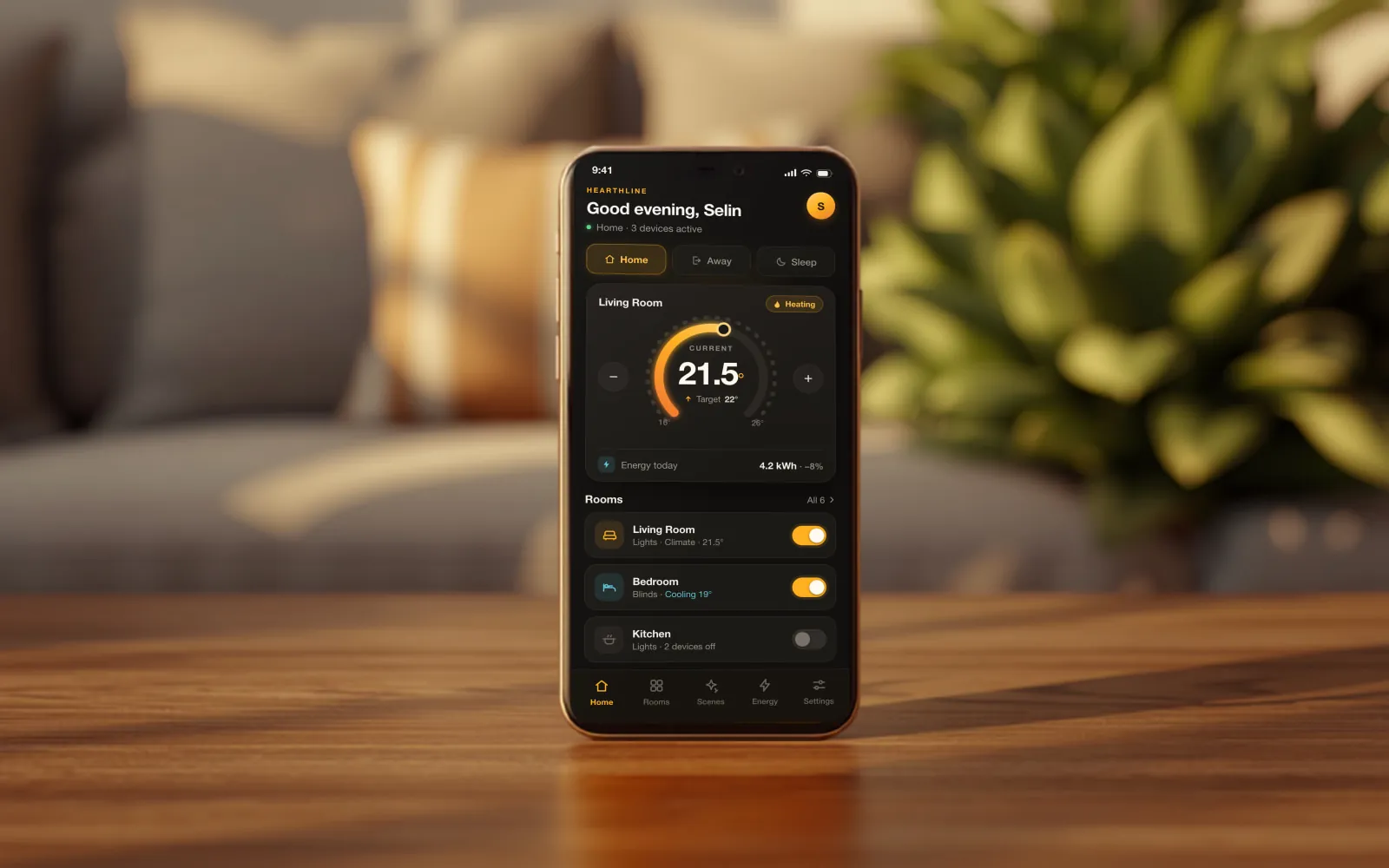
Smart Home Control App
Lighting and climate are managed room by room from a phone; Home, Away and Sleep modes move the whole house at once.
View case studyRelated services
Let's pin down your project
Tell us what you want to build. We put scope, timeline and cost in writing before any work starts.
Last updated: